



We had 5 weeks to work on this project
The new features we would create would be the Points Overview, Streaks Feature, Participating Stores, & Redemption Process which each had their own obstacles to overcome.
My team consisted of 4 members who took on different roles & responsibilities for this project.
Parth Bhakta - Research, Design, Usability Testing
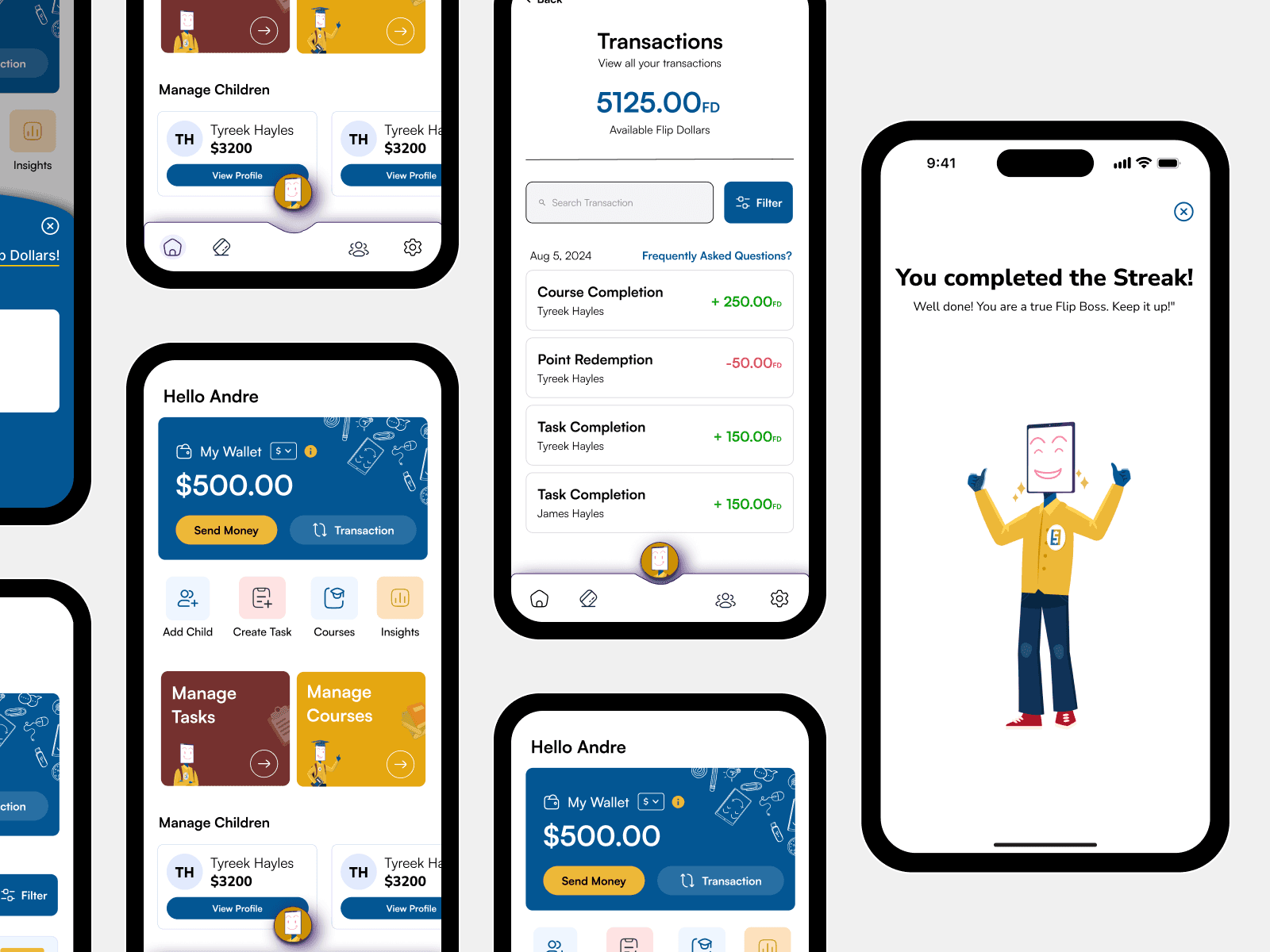
• Points Overview - A user dashboard that would display all of the user's points earned and allow them to view their points history from all the different activities they conducted.
Casey Moreno - Team Leader, Research, Design, Usability Testing
• Streaks Feature - An asset that would reward users for their participation in every learning curriculum they complete & help them keep track of their learning progress so far.
Nengi Ikoli - Research, Design, Usability Testing
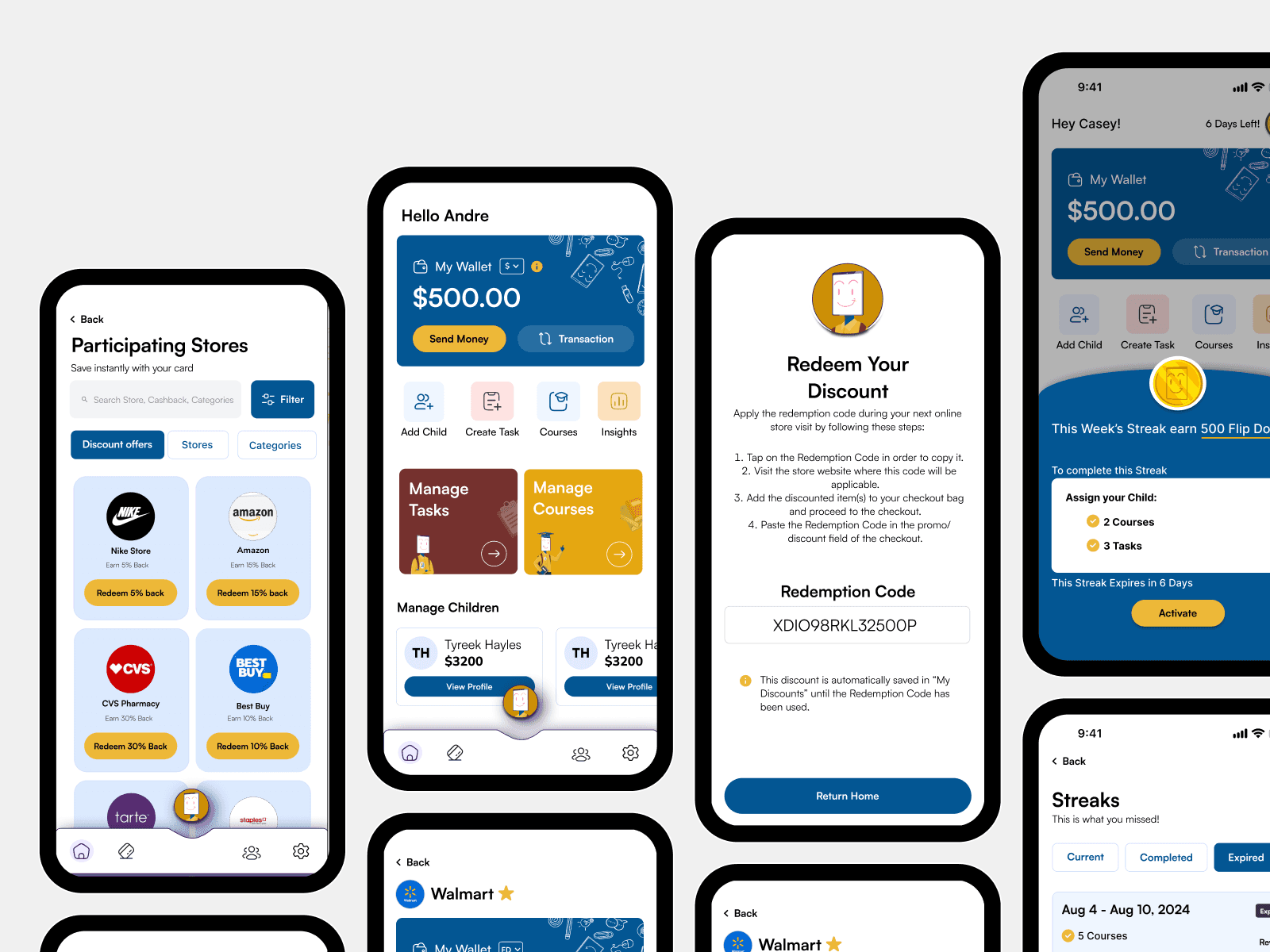
• Participating Stores - A user page(s) that would display all of the stores that have partnered with Flip & Floss and where user's could use their points to exchange for discounts at these stores. Users would be able to search & filter out any stores or discounts they are interested in.
Luigy Rivas - Research, Design, Usability Test
• Redemption Process - The user journey that allows user to redeem their points for discounts & receive confirmation on their exchanges.
July 24, 2024 - August 30, 2024 (5 weeks)
The company is looking to design new pages for their app and incorporate new features surrounding their Loyalty & Rewards Program. Each team member had to take on one of the new features for the Loyalty & Rewards program & create the wireframes that would fall under it.
The main goal for the project is to build mobile user-friendly wireframes and prototypes that would incorporate the new features surrounding their new loyalty & rewards program.


The Flip & Floss client provided us their research notes on the common issues users had with their app & what they benefitted from the app.
Common In-App Issues
In order to understand the common issues users had with the app, the client provided us their research notes they've gathered with users plights & gave us access to their app in order to check it out for ourselves.
Secondary Research:
In-App Currencies:
From the notes we read & our own interaction with the app. The main concern users had with the app was the fact that they couldn't tell the difference between the in-app currency "Flip dollars", Loyalty Points, and Real Money. Many of them also questioned on what was the purpose for each of these different types of currency.

Unresponsive Buttons/Keypads:
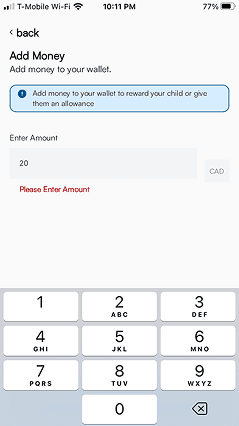
From our experiences with our own devices, we identified that certain buttons were unresponsive to our interactions as well as certain keyboards. This could be due to older device models that were used which were no longer compatible with the app or the size of the buttons.
Competitors
After conducting our secondary research on common in-app issues that existed in the Flip & Floss app. We looked into some of the competitor apps that inspired Flip & Floss to incorporate a Point, Streak, Reward, & Store system in place.
Petal
Visual Hierarchy & Cashback Display: The prominent display of cashback amounts and visual hierarchy guides users’ attention to important information, such as how much they can save. This approach could be utilized in the Flip & Floss app to emphasize the benefits and rewards users can earn.


Chase Offers
Categorization: The use of tabs to categorize offers (e.g., All, Groceries, Food & Drink, Gas & Auto) allows users to quickly navigate and find relevant discounts.
Visual Representation of Savings: The display of the total amount saved at the top of the screen provides immediate feedback on the user’s progress and benefits, which can motivate continued participation. Incorporating a similar feature can help users see the tangible benefits of engaging with the loyalty program.


Wells Fargo
Brand Logos and Clear Merchants Display: The use of recognizable brand logos and clear merchant names makes it easy for users to identify and connect with the offers. This enhances user trust and makes navigation straightforward.
Filter and Category Options: The presence of filtering options allows users to sort deals by category, merchant, or availability. This helps users quickly find relevant deals, improving the overall usability and user experience of the interface.

After reading through their research notes & looking into their competitors. We proceeded into the Ideation phase where we brainstormed on how we would design these new features for the app.
Sketches
Based off our research, these were the sketches we made for each of the new features that were to be implemented.
Points Overview
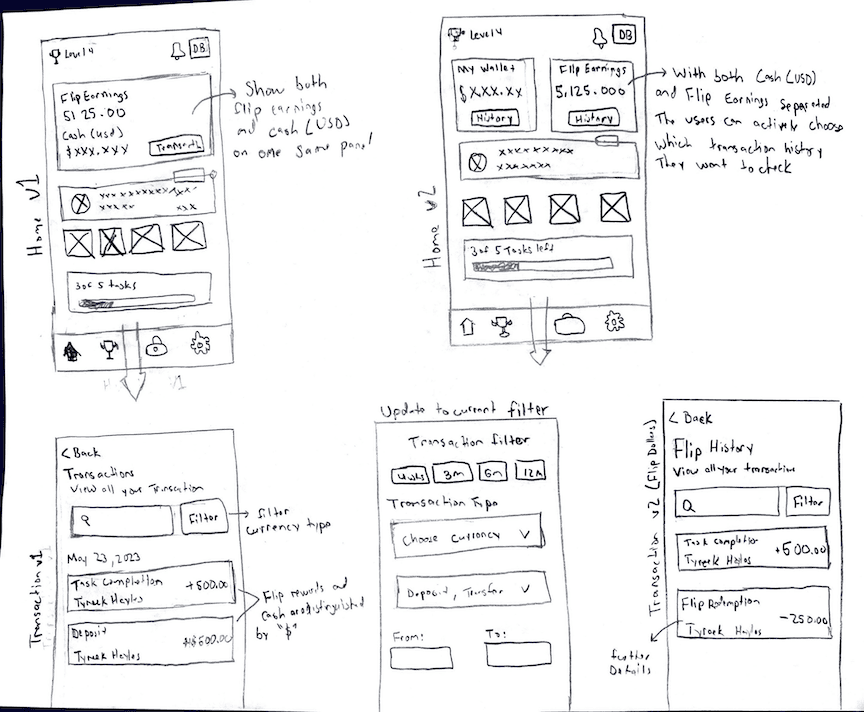
Separation of Currencies: With the different types of currencies that are used in the app & the confusion it causes, we figured it'll be best to limit the amount of currencies to just the in-app currency, Flip Dollars, and real currency, USD. We also figured it would be best to substitute the loyalty points for Flip Dollars since there was no clear indication of their different usages like how they were earned & when they could be used.
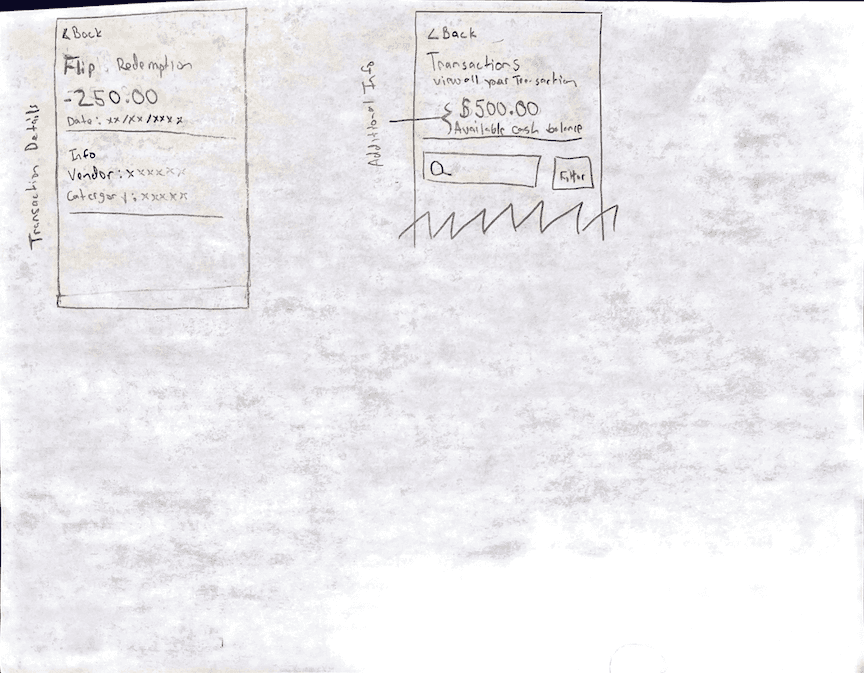
List of Transactions/Exchanges: Showcasing a list of transactions & exchanges a user had done was a key aspect that we agreed needed to be shown.
Streaks Feature
Implementation of Streaks: One of the focuses was to encourage users to maintain a consistent engagement in the app; the inclusion of a streak feature would encourage users to further engage with the app & allow them to gain some in-app benefits like the Flip Dollars for their participation.

Participating Stores
Discounts at Stores: The incorporation of partnering stores was pivotal for the app. Within the app, these stores would provide deals to users in exchange for the in-app currency, Flip-Dollars, which the user has accumulated.
Navigation: The design needed to include a comprehensive list of all participating stores, with detailed information such as location, contact details, and types of discounts offered.

Redemption Process
Checkout Process: It was important to display how users would proceed with exchanging their Flip Dollars for the store discounts they wanted.
Discounts Saved: Users needed to be able to save, organize, & view their discounts that they haven't used yet.

After creating our sketches based on the research & meetings we had with the company. We proceeded into the Design phase, where we created design iterations of the app.
Low Fidelity Wireframes
From our sketches, we built the first iterations of our designs in low-fi models. This was to have a quick understanding & snapshot of how our design would potentially turn out.
Points Overviews

Streaks Feature

Participating Stores

Redemption Process

High Fidelity Wireframes
From our Low-Fi wireframes, we reviewed our designs within our team & with the company, from the feedback we received. We made adjusts to our designs as we proceeded into our High-Fidelity wireframes.
Points Overview

Streaks Feature

Participating Stores

Redemption Process

After designing our HiFi wireframes, it was time to conduct our usability test and make the final edits based on the feedback we received from out testing pool.
Usability Testing
Each team member interviewed & tested 5 participants, where they allowed them to engage with the design concepts they had created for their part in the app.
Points Overview
Findings:
• 5 out of 5 users found the homepage was easy to navigate.
• Many users thought it was engaging and had an understanding of where they'll need to go.
• 2 out of 5 users noted that the “i” was hard to press. They would accidently press the button to change between “Flip Dollars” and “My Wallet”
• 5 out of 5 found viewing and accessing transactions to be easily completed by all users
• 1 out of 5 users found the method to filter the different children to be a bit confusing
Changes Made:
• Created additional spacing between the “i” and FD and My Wallet button to allow easier access to both buttons
Streaks Feature
Findings:
• 1 participant had trouble locating were to find streaks, but had no issues once they located the slider.
• 1 participant also could not identify the slider location, and could not find information about previously offered streaks.
• Both participants that had trouble locating the streak information, did not know what a streak was, and were heavily focused on the top/center of the app with it’s large, brightly colored cards.
Changes Made:
• A dark background was placed over the homepage, behind the slider, to indicate to the user that the homepage is currently disabled, and to guide them to the area where they must interact with the streak information.
• Increased text size on slider prompt
• Made some directions bold
Participating Stores
Findings:
• The steps to redeem a reward were intuitive and well-structured. The "Redeem" buttons were clearly labeled, making it easy for users to understand how to initiate the redemption process.
• The final confirmation page could benefit from including a brief summary or recap of the redeemed offer. Without this, users might be left wondering about the specifics of what they just redeemed.
• The confirmation page might leave users at a dead end if it only confirms the action without suggesting what to do next. Adding a call to action, such as "Continue Shopping," "View My Rewards," or "Go to Checkout," could enhance the user experience by providing clear directions.
Changes Made:
• Include a brief summary or recap of the offer that was just redeemed.
• Add a call to action that guides the user on what they can do next after the confirmation page.
Redemption Process
Findings:
• All participants main concern was what did “FD” stand for within the "My Wallet" section.
• Most users were confused on what the Redemption Code will be used for. Some suggested having an informational prompt or tutorial showing them how to use the Redemption Code.
• Some users were also confused if the Discount was automatically saved into their account for later use. One suggestion was to add a button or prompt that states the discount would be saved.
Changes Made:
• Added in an additional page to the "Discount Applied" section; this page labelled as "Redeem Your Discount" now provided more instructions on how users could redeem their Redemption Code.
• Added in a info-prompt in the Confirmation section which informed users their discount was automatically saved to their account once they applied for it.
Overall, we believe we were successful in designing an onboarding process for the Loyalty & Rewards program in the app.
Key Takeaways
Most users were able to fluidly navigate through the Loyalty & Rewards program, starting from the Points Overview section and finishing at the Redemption Process without any external help.
Adding more informational prompts to areas that contained Flip Dollars (FD) provided more clarity to users in understanding it was a in-app currency that could be earned & redeemed.
Ensuring the layout, design, and terminology was easily comprehensible for both kids and parents was a success.
Roadmap Moving Forward
Based on our work & the findings from our last usability test, these could be the next steps:
Conduct further research into the pain points, benefits, and motivations users have with the app overall, further insight into these areas could lead us to making further improvements to our designs.
Orchestrate the designs & layouts for some of the other sections of the app which we didn't have time to touch base with, areas like the "Settings" or "Class" sections.

© 2023 Luigy Rivas. All clever phrases & jaw-dropping designs reserved.